
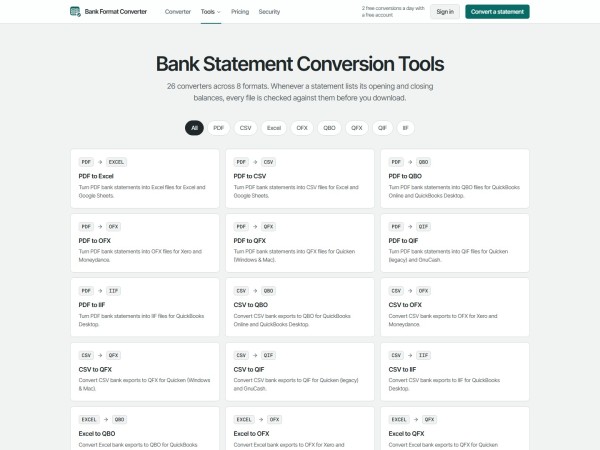
Bank Format Converter provides 26 dedicated converters across PDF, CSV, Excel, OFX, QBO, QFX, QIF, and IIF for QuickBooks, Quicken, Xero, and spreadsheet audits. Features include OFX 1.02 bank ID mapping, automatic balance checks, two free daily downloads, and upfront annual page allowances.
United States, 18th Nov 2026 – Bank Format Converter, which debuted publicly on November 16, 2026, gives accounting teams, bookkeepers, and individual Quicken users 26 specialized conversion tools spanning eight financial file formats. Built to eliminate broken CSV imports and bank feed gaps, the web workspace outputs verified QuickBooks, Quicken, Xero, and Excel files checked against printed statement balances before download.
Importing raw bank data into ledger software breaks in predictable ways. A generic CSV download lacks unique transaction identifiers, so re-importing an overlapping date range duplicates expenses inside QuickBooks Online. Worse, one bank places debits and credits in separate columns while another relies on negative signs, causing imported deposits to post backward as charges. Meanwhile, Quicken frequently rejects standard OFX exports that lack an Intuit bank identifier.
Bank Format Converter groups its 26 converters by the accounting software waiting at the end of the cleanup. Bookkeepers loading historical checking statements into QuickBooks Online or QuickBooks Desktop run PDFs through the PDF to QBO converter or map inconsistent spreadsheet columns through the CSV to QBO converter, confirming detected Date, Description, and Amount fields on screen first. Every QBO and QFX file follows the OFX 1.02 standard with transaction IDs that prevent duplicate imports and a configurable Intuit bank ID (`INTU.BID`, defaulting to 3000 and adjustable under export options when QuickBooks requires a specific bank code). When QuickBooks prompts during Web Connect import, users simply link the feed to their real bank account.
Bridging QuickBooks, Quicken, and spreadsheet audits
Legacy accounting workflows rarely move in just one direction. Alongside Web Connect feeds, QuickBooks Desktop practitioners can produce ready-to-import IIF files directly from PDFs or CSV spreadsheets mapped to their chosen QuickBooks Desktop account name, avoiding hand-written tab-delimited headers.
Quicken users facing rejected generic bank files can convert statements with the PDF to QFX converter or build QIF imports from CSV and PDF records. Accounting firms also run into the opposite problem during audits and tax prep: a client emails closed-period QBO, OFX, or QFX archive files with no readable spreadsheet attached. Reverse tools such as the QBO to Excel converter, QFX to PDF, and OFX to CSV unpack software-only feeds back into clean spreadsheet rows or printable statements for CPA review.
“When a client drops twelve months of mixed PDFs, old QFX downloads, and messy CSV files on your desk before tax deadline, reformatting eats half the afternoon,” a spokesperson for Bank Format Converter said. “Having every major destination format under one balance-checked workspace cuts out the macro headaches.”
Balance verification, browser privacy, and OCR controls
Clean ledger imports depend on spotting extraction mistakes early. Whenever a source PDF or balance-equipped spreadsheet lists starting and ending figures, Bank Format Converter calculates Opening plus Deposits minus Withdrawals against the printed Closing balance and flags any difference right away. Failed conversions never cost pages.
Digital bank exports and text-based PDFs up to 25 MB convert locally inside the browser, never reaching remote servers. Password-protected PDFs unlock directly on the user’s device without transmitting passwords over the network. For scanned paper statements or camera photos, optional server-side OCR starts only after explicit user confirmation on a screen naming both processing partners: Microsoft Azure AI Document Intelligence for text and coordinate extraction, and Anthropic’s Claude for structuring transaction rows. Server processing runs in memory, temporary Azure output triggers immediate deletion, and structured rows return straight to the browser.
Upfront annual allowances built for tax season peaks
Bookkeeping workloads swing hard across the year. Tax filing deadlines, year-end closes, and multi-month client cleanups create sudden volume spikes that punish rigid monthly limits.
Annual plans on Bank Format Converter unlock the full yearly page allowance on day one at half the monthly rate. Starter provides 500 pages monthly at $15 or 6,000 pages upfront for $90 a year, while Professional covers 1,250 monthly pages at $30 or 15,000 pages a year for $180. High-volume practices on Business get 5,000 pages per month at $50 or 60,000 pages upfront for $300 annually, with each page counted as one PDF page or up to 50 rows of CSV, Excel, OFX, QBO, QFX, QIF, or IIF data.
All three paid plans include every converter, OCR support, and mathematical reconciliation checks with zero automatic overage fees, billed through Stripe or Waffo. Upgrading to a larger tier starts a new billing cycle immediately while crediting unused time on the current subscription; downgrades take effect at the next renewal, and users can cancel anytime from Manage billing on their Account page. Before picking a plan, a free registered account with no credit card downloads two files per day at any length, including scanned statements. Exporting the exact same file into both Excel and QBO counts only once via one-way SHA-256 file hashing, failed jobs cost zero pages, and unused paid periods can be refunded within seven days of a charge when zero pages have been spent.
Prospective users should note what the tool leaves out by design. Bank Format Converter does not offer a public API, shared team seats, or unattended bulk folder automation, and unused subscription pages do not roll over after a billing reset. Even when opening and closing totals balance cleanly on a PDF, software-only bank feeds like QBO, QFX, OFX, QIF, and IIF omit printed statement balances for automatic math checking. Automated parsers can also misread dates or descriptions, so preparers review extracted lines before posting into QuickBooks, Quicken, Xero, or tax filings.
About Bank Format Converter
Bank Format Converter is an online financial document conversion workspace supporting PDF, CSV, Excel, OFX, QBO, QFX, QIF, and IIF workflows across 26 specialized converters. Designed for accounting practitioners, business owners, and personal finance users, the platform combines local in-browser processing, explicit OCR disclosures, and automatic balance reconciliation.
Media Contact
Organization: Bank Format Converter
Contact Person: Bank Format Converter Media Relations
Website: https://bankformatconverter.com/
Email: Send Email
Country: United States
Release id: 50863
View source version on King Newswire:
Bank Format Converter Unifies 26 Accounting File Tools Across 8 Formats

Disclaimer: The views, suggestions, and opinions expressed here are the sole responsibility of the experts. No FUNDS MANAGEMENT journalist was involved in the writing and production of this article.